
Tampilkan postingan dengan label TEKNIK. Tampilkan semua postingan
Tampilkan postingan dengan label TEKNIK. Tampilkan semua postingan
25 Juli 2015

11 Juli 2015
15 Oktober 2014
Reengineered Process and supporting Procedures
The reengineered process and supporting procedures:
- Must support the mission and principles of the organization and be oriented to the customer.
- Must not be oriented toward short-term objectives and actions at the expense of the long term.
- Must be oriented towards enterprise-wide objectives rather than more limited departmental or program objectives.
- Must establish consistency with other business processes, policies and procedures.
- Should be established to promote desirable behaviors rather than be a reaction to relatively infrequent problems or situations.
- Must be straight-forward, simple, unambiguous and easy to administer.
- Should encourage improvement and innovation rather than defensive behaviors.
- Should be based on assumption of responsible behavior and trustworthy employees rather than extensive controls that diminish employee pride and self-esteem.
- Should diminish barriers between people, groups of people, and departments and should promote teamwork.
- Should reflect performance measures and accountability that are within employees', department's, or company's control.
- Should foster action and decision-making at the lowest competent level.
- Should address consideration of total cost of actions, not just limited costs reported by the accounting systems.
- Should reflect the minimum of communication and coordination required for actions and decisions, but not limit communication and coordination to narrow procedural boundaries.
- Should not cause extra work or costs for a problem that rarely occurs.
- Should avoid redundant efforts across the organization.
- Must be consistent with regulatory and contractual requirements.
- Should minimize non-value-added activities.
10 Februari 2012
11 Januari 2012
23 Desember 2011
abb SIMULATOR
Bailey DCS Simulator
This CD-ROM software product will execute your Bailey DCS binary CFG files on a PC. Execute even the largest systems with a capacity in excess of 100 controllers & 400,000 blocks.
This CD-ROM software product will execute your Bailey DCS binary CFG files on a PC. Execute even the largest systems with a capacity in excess of 100 controllers & 400,000 blocks.
- Test out new control logic before installing it
- Test/FAT new operators consoles
- Create a full scope complete operator training facility.
- Connect ABB EWS software, including Composer, WinCAD, WindowViewer and more...
- Connect your existing operator console, a Previse operators console or any standard ABB or other operators console.
- Execute up to 10 X faster than real time
- Save & Restore Process State
simulation-solutions.com
3D Virtual Reality Simulator
For the first time, all aspects of a modern refinery are modeled simultaneously and in realistic detail: plant equipment and layout, DCS controls and instrumentation, navigation, and dynamic operation. Operating teams can now explore and run a Virtual Refinery from any PC in the plant.Recent accidents and subsequent industry/government panel recommendations highlight the importance of improving the quality of the training provided to the “Outside Operator.”
Our partner company ExplainMedia has taken proven Simulation Solutions training programs, long made available to DCS operators, and is rendering corresponding 3D Virtual Refinery Outside Operator modules. With these added virtual reality capabilities, Outside Operators can actually open and close hand-operated valves, start and stop pumps, take field reading, see and hear equipment running, communicate with the control room, etc. Instructors can mentor and manage training sessions, instead of being tied up in role playing the functions of an Outside Operator from previously provided “remote function” switches.
Users can navigate both outside and inside valves, pumps, towers, and reactors and observe dynamically over a full range of operating conditions how equipment, feedstock, catalysts, and products respond to changing feed rates, temperatures, pressures, etc. All Outside Operator station functions and responses are being driven by differential equations and mathematical models, not mere animation routines.
The first Virtual Refinery package being offered is a 12 module Distillation Series. The Distillation Series is the first of a set of off-the-shelf Series, and will be quickly followed by comprehensive Series for Furnaces, Compressors, Crude Units, FCC, etc. On-line demonstrations are available.
Detailed Custom Programs, realistic DCS Emulations, and state-of-the-art Virtual Reality based Outside Operator Stations combine to form the key elements of the Virtual Refinery, and create a “test bench” capability for safety and engineering studies previously unavailable. Users can “field test” control schemes and outside operator duties against a virtual plant, and also improve procedures, conduct realistic training for entire operations teams, and ultimately help develop the most efficient and safest way to troubleshoot and respond to plant upsets and emergencies.
Don Glaser, Simulation Solution, and Wilco Sas, ExplainMedia are confident that this new Virtual Refinery will help refinery clients “create expert teams” versus “teams of experts”, closely following the best practice model for “Crew Resource Management Training” in wide use in the airline and aerospace industries.
| Key Training Issues | Traditional Simulators | Virtual Refinery |
|---|---|---|
| Intended Audience | Console Operators | Console Operators, Outside Operators, and Supervisors |
| Scope | Central Control Room with 'FOD' screen on Instructor Station | Complete 'process' training simulator in a virtual environment |
| Training Objectives | Train Console Operators in Normal and Abnormal Conditions, Start- up and Shut-down, etc. | Train Outside Operators, Console Operators, and Supervisors in all aspects of Operations, and “Human Factors”: Communication, Collaboration, etc. |
| Training Approach | Singular, requires multiple/ different training classes to accomplish “technical” and “human factors” training for Console Operators/Others | Able to accomplish both “technical” and “human factors” training simultaneously for all trainees – Console Operators, Out-side Operators, and Supervisors |
| Training Environment | Isolated, disconnected from the rest of the team | Lively, interactive, involves multiple trainees working together as a life-like team |
| Instructors | Often substitutes for Field Operator using the FOD Panel – which is ‘unrealistic’ for training | Provide training support and direction to the entire “operations team” and help to develop “team work skills” as Virtual Refinery provides the console/outside operations capabilities |
| Economics/ Benefits | All costs related to a single group of trainees – Console Operators. Other classes/tools for other training costs more money | "Two Simulators but more than twice the benefit”. Useful for training in a lifelike and realistic setting |

SIMULATOR
Simulator
| Key Training Issues | Custom Simulators | Generic Simulators |
|---|---|---|
| Starting Point; Training Focus | Complete unit--focus is inter-action of sub-parts. Difficult to isolate and practice sub-parts | Exchangers, pumps, towers, reactors, boilers, compressors, turbine, etc. --focus is sub-parts of a unit |
| Works best at developing | Complete unit operating skills for Senior Operating Levels | Fundamentals and Dynamics of process and controls for all Operator levels |
| Training Objectives | “Operating tactics”: Specific tasks and operations that apply to one unit | “Operating Strategies”: Practices and procedures that apply across the board |
| Trainee | Operator knows fundamentals and is well prepared for advanced training | Operator is weak in “fundamentals and dynamics” |
| Simulator Usage, Logistics & Overtime | Limited to specialized Simulator HW & Simulator room; training often requires overtime | Simulators run on PCs in control room or rest of plant able to train on-shift, unlimited access |
| Training Sessions | Need to be carefully scheduled ; 8 hour sessions are typical | Easily self-scheduled, 60 minutes equals several lessons |
| Instructors | Essential and critical to success of Custom Simulator training | Instructor’s development work done in advance, less on-going effort |
| Benefits | Reduced incidents, faster and smoother start-ups, less equipment damage, fewer emissions, increased morale, increased confidence and competence | Builds confidence, increases awareness for outside operators, ties up all the separate fundamentals topics into a complete package, good stepping stone |
| Delivery and Cost | 12+ months delivery; costly to develop and maintain. Needs high level management support and funding | Immediate delivery; relatively low cost –- can be licensed |
| Key Training Issues | Emulated DCS | Actual DCS | ||||||||
|---|---|---|---|---|---|---|---|---|---|---|
| Starting Point; Training Focus | DCS basic operation and access/use of all key DCS displays: Graphics, Faceplates, Groups, Trends, Tuning, Alarms | Complete DCS operation of all displays and functions | ||||||||
| HMI | Single/Multiple Station operation with virtual and/or actual DCS Keyboard/mouse/ track ball | Multiple Station operation with actual DCS Keyboards and/or Touch screen and/or Mouse and/or Trackball | ||||||||
| Instrument Configurations | Actual configurations recreated on Emulated DCS platform via “block data transfer” and single item entry/updates | Actual DCS Configurations downloaded and uploaded to/from actual DCS <-> Simulator | ||||||||
| Dynamic Graphics | Actual DCS Graphics are used with all live data points, navigation, dynamic valves, levels, etc. recreated | Actual, full-function DCS Graphics are used as they relate to the Equipment and Instruments included in Custom Program | ||||||||
| DCS HW Maintenance | Emulated DCS Simulators run on PCs; no real maintenance issues specific to Emulated DSC platforms | Requires routine maintenance and stocking of spares where applicable; need to ensure that Simulator DCS parts are not used as plant spares. | ||||||||
| Number of Simulator Stations per Custom Program Model | “Unlimited” --Operates across plant-wide PC network -- in control room, training center, or rest of plant; easy scale up for start up and turnaround training | Limited to number of actual DCS stations purchased, depending on implementation, can be 1 DCS platform per Custom Program Model | ||||||||
| Upgrade to later DCS releases and/or new DCS vendor | Limited modifications based on key DCS displays or new Emulated DCS option developed and added to on-line Configuration menu | Upgrades depend on DCS HW chances and SW licenses; new DCS vendor upgrades are extensive/costly | ||||||||
| “Available for Training” | “Click and Go”; Train anywhere/anytime; available for self-study and practice; no dependent on an Instructor being available | 1. Is DCS HW/SW working today? 2. Are Trainees available to come to the Simulator Center? 3. Is the trained Instructor there (days)? | ||||||||
| Delivery and Cost | Immediate delivery of available Emulators; relatively low cost –- can be licensed | Multi-months delivery; costly to acquire and maintain. Needs high level management support and ongoing funding |
| ||
| Add caption |
SIMULATOR PSS® Product Suite
Siemens has used its great experience and know-how in network planning to develop powerful system simulation and analysis tools to assist engineers in their highly responsible work. The software tools of the Power System Simulator PSS®Product Suite are leading products with respect to technical performance and user-friendliness. Comprehensive interfaces enable the interaction of all PSS®Product Suite tools, and also support the integration with other IT systems.
Overview of our main software products:
- PSS®E - transmission system planning
- PSS®SINCAL - utility and industry system analysis
- PSS®NETOMAC - dynamic system analysis
- PSS®ODMS - operational data management
- PSS®MUST - transmission system analysis
- MOD® - model on demand
Full Scope Simulators
Superior Training Systems from the World’s Leading Simulation Company
L-3 MAPPS simulators provide superior real world power plant training. L-3 MAPPS offers a variety of products and services including full scope simulators, part-task trainers, simulator retrofits and upgrades. We provide conception to completion turnkey systems, specific components, and simulator design tools as required by the customer. With worldwide presence, a solid leadership position and the ability to provide any level of customer support, L-3 MAPPS ensures the success of your simulator projects. Our simulators offer the highest quality in simulation fidelity and training to provide trainees and instructors with userfriendly tools for learning, controlling and exploring complex power plant systems.
The superior training environments of our simulators provide clear advantages for operator licensing, optimizing plant operating procedures and reducing costs. Operators trained on L-3 MAPPS simulator environments gain the skills necessary to increase plant performance, minimize downtime, and provide confident emergency response. Simulator uses include interactive team training, severe incident management, plant design testing, and startup/shutdown optimization. L-3 MAPPS’ replica-quality hardware controls and touch-screen virtual panels create realistic and credible control environments. Real-time response to operator actions and interactive instructor control ensure maximum training effectiveness and adaptability. Any scenario, no matter how complex or dangerous in a real plant, can be reproduced, monitored and varied in real-time, providing a valuable tool for training and plant engineering. Our commitment to customer support extends far beyond industry norms. L-3 MAPPS’ unique knowledge transfer program allows customers to gain expertise and total confidence in the simulator. Users can directly implement simulator modifications to exactly reflect plant changes, evolve their training programs and expand simulator use into other areas.
Uses and Advantages
Cost effective training for:
- Both experienced operators and new recruits
- Overall plant and individual system operation and control
- Team training to study interaction and improve performance
- Emergency plan implementation and incident management
- Command of malfunction and transient situations
- I&C familiarization
- Plant process computer training and testing
- Classroom simulator training
Other Benefits:
- Operations optimization, including startup and shutdown
- Reduced unplanned outages
- Improved plant safety
- Easy to upgrade simulator and keep current with plant
- Multiple configurations on one simulator
- Analysis of plant response to equipment and/or instrument failure
- Efficient plant design planning and upgrading
20 Desember 2011
LOAD REJECTION PLTU BATU BARA
Load=Beban
Rejection=Penolakan
Load Rejection pada test pemabngkit adalah test apabila pada saat beban 100% MCR, mengalamai penolakan dari jaringan atau terjadinya gangguan saluran hingga tidak dibutuhkan beban, atau di minta 0% MCR, atau proteksi jaringan bekerja.
Pada pembangkit kecil biasanya digunakan hingga pada putaran nominal turbine generator, akan tetapi untuk pembangkit besar seperti 400 MW, beban terendahnya bila terjadi load rejection adalah sejumlah pemakaian sendiri, umumnya 10% dari beban Hostload atau pemakaian sendiri sebesar. (+/- 40 MW)
Mengapa demikian?
Karena untuk pembangkit batu bara bila terkadi trip, sangat sulit dan butuh waktu lama untuk menormalkan kembali, makanya di upayakan hostload position yang 10 %.
Nah untuk mencapai itu perlunya penataan sistim control dan sequence, yang benar benar akurat, dan perlunya di test atau commisioning apabila adanya perubahan perubahan atau rehabilitasi pada pembangkit tersebut.
Tentu hal ini di wajibkan untuk pembangkit yang baru di buat.
Pertanyaan berikutnya
Akan dikemanakan energi yang 80%.
Tentu energi sebesar itu tidak mudah untuk disalurkan atau dibuang begitu saja, nah untuk ini umumnya digunakan satu sistim yang dinamakan HP dan LP ByPass Sistem.
Dan tahap berikutnya untuk mengurangi pembuatan uap yang terus menerus, dalam hal ini pengurang dilakukan untuk mematikan beberapa level burner system, minimal untuk 50% MCR. jadi secara pengalaman kami terjadi perhitungan sederhana yaitu.
10% s/d 15% untuk Host Load
35% s/d 40% diKelola oleh HP/LP Bypass untuk disirkulasikan ke condensor
50% dimatikan/diOff dari sistem pembakaran.
Jadi pembangkit yang handal test atau commisioning ini sangat mutlak dilakukan dengan hasil BAIK.
artinya bila dilakukan tidak terjadi unit trip.
Apalagi saat ini sudah menggunakan sistem control digital seharusnya tidak ada masalah, terkecuali salah satu sistim yang diperlukan secara operasional ada kerusakan.
Rejection=Penolakan
Load Rejection pada test pemabngkit adalah test apabila pada saat beban 100% MCR, mengalamai penolakan dari jaringan atau terjadinya gangguan saluran hingga tidak dibutuhkan beban, atau di minta 0% MCR, atau proteksi jaringan bekerja.
Pada pembangkit kecil biasanya digunakan hingga pada putaran nominal turbine generator, akan tetapi untuk pembangkit besar seperti 400 MW, beban terendahnya bila terjadi load rejection adalah sejumlah pemakaian sendiri, umumnya 10% dari beban Hostload atau pemakaian sendiri sebesar. (+/- 40 MW)
Mengapa demikian?
Karena untuk pembangkit batu bara bila terkadi trip, sangat sulit dan butuh waktu lama untuk menormalkan kembali, makanya di upayakan hostload position yang 10 %.
Nah untuk mencapai itu perlunya penataan sistim control dan sequence, yang benar benar akurat, dan perlunya di test atau commisioning apabila adanya perubahan perubahan atau rehabilitasi pada pembangkit tersebut.
Tentu hal ini di wajibkan untuk pembangkit yang baru di buat.
Pertanyaan berikutnya
Akan dikemanakan energi yang 80%.
Tentu energi sebesar itu tidak mudah untuk disalurkan atau dibuang begitu saja, nah untuk ini umumnya digunakan satu sistim yang dinamakan HP dan LP ByPass Sistem.
Dan tahap berikutnya untuk mengurangi pembuatan uap yang terus menerus, dalam hal ini pengurang dilakukan untuk mematikan beberapa level burner system, minimal untuk 50% MCR. jadi secara pengalaman kami terjadi perhitungan sederhana yaitu.
10% s/d 15% untuk Host Load
35% s/d 40% diKelola oleh HP/LP Bypass untuk disirkulasikan ke condensor
50% dimatikan/diOff dari sistem pembakaran.
Jadi pembangkit yang handal test atau commisioning ini sangat mutlak dilakukan dengan hasil BAIK.
artinya bila dilakukan tidak terjadi unit trip.
Apalagi saat ini sudah menggunakan sistem control digital seharusnya tidak ada masalah, terkecuali salah satu sistim yang diperlukan secara operasional ada kerusakan.
14 Desember 2011
ENGINEERING DESAIN & DOKUMENTASI
1. Ikhtisar
Kegiatan Engineering desain dan dokumentasi dapat dibagi secara luas menjadi dua bagian: front-end engineering teknik dan detail enginering. Front-end engineering akan bervariasi sesuai dengan ukuran proyek dan kondisi, tetapi pada akhirnya, isinya harus menetapkan persyaratan proyek, engineering standar, pedoman unit, dan persyaratan hukum yang berlaku, pengaturan dasar untuk kesuksesan engineering yang detail.
Detail engineering mencakup penyusunan semua dokumen detail yang diperlukan untuk mendukung permintaan tawaran, konstruksi, commissioning, dan pemeliharaan unit. Dalam ini lingkungan bisnis, ukuran perusahaan dan staf teknik unit pada umumnya mempunyai tingkat yang minimum, sehingga fase engineering detail tentang proyek-proyek besar sering diberikan ke engineering kontraktor atau pemasok peralatan. Dalam beberapa kasus, instrumentasi dan kontrol (I & C) sebagian engineering proyek dikontrak sebagai bagian dari engineering yang paketnya lebih besar yang mencakup disiplin lain seperti sipil, listrik, mekanik, dan sejenisnya.
2. Front-end Engineering
Front-end engineering adalah langkah pertama dalam desain engineering. Hal ini mendefinisikan persyaratan I & C dan mencakup penyusunan data teknik yang dibutuhkan untuk memulai desain detail. Ini fase, dari sudut pandang I & C, biasanya sejajar dengan penyusunan proses awal dan diagram instrumentasi (P & ID) kadang-kadang dikenal sebagai aliran teknik diagram- dan penyelesaian analisis bahaya untuk proses terkendali.
Analisis bahaya merupakan bagian penting dari kegiatan desain. Namun, karena tidak biasanya kegiatan yang dipimpin oleh I & C engineering, tidak akan dibahas dalam buku ini. Jika pembaca membutuhkan informasi tambahan mengenai hal ini, dapat ditemukan di OSHA's Paruh 1910, Lampiran D, dan publikasi terkait lainnya. Secara umum, tiga dokumen yang harus disiapkan selama fase engineering front-end dan diselesaikan sebelum memulai desain detail. Mereka adalah: P & ID, definisi sistem kontrol (Yang mungkin termasuk instrumen indeks awal), dan diagram logika. Pada proyek besar, dua dokumen tambahan mungkin diperlukan: definisi lingkup kerja untuk engineering kontraktor yang akan melakukan teknik rinci (lihat Lampiran C), dan lingkup pekerjaan definisi pemasok peralatan dikemas, seperti fasilitas pengolahan air bersih, boiler, kompresor, dan sebagainya (lihat Lampiran D).
Dokumen Front-end engineering harus diperbarui sebagai perubahan yang dibuat selama proyek, dan perubahan terjadi. Begitu dokumen-dokumen ini disetujui dan disepakati, tidak ada perubahan yang harus dilaksanakan tanpa persetujuan terlebih dahulu dari manajer proyek dan engineer kontrol yang ditugaskan (Atau supervisor, kontrol tergantung pada kebijakan perusahaan). Alasan ini adalah untuk mengontrol perubahan, karena dokumen-dokumen ini adalah pedoman untuk detail engineering yang mempengaruhi kontraktor dan vendor, yang berdampak pada jadwal dan anggaran.
3. Detail Engineering
Detail engineering harus berdasarkan persyaratan hukum yang berlaku di lokasi proyek dan persyaratan dari front-end engineering. Dokumentasi yang dihasilkan di bawah detail engineering akan bervariasi sesuai dengan kompleksitas proses, persyaratan proyek, dan filosofi unit dan budaya. Berikut ini dianggap sebagai informasi teknis minimum untuk bidang I & C; manajemen teknik harus memutuskan apakah ada dokumen tambahan yang diperlukan:
• Instrumen indeks.
• Proses lembar data
• Lembar spesifikasi Instrumen, termasuk perhitungan (untuk katup kontrol, pelat orifice, dll)
• Loop diagram
• Interlock diagram
• Spesifikasi kontrol Panel (termasuk layout keseluruhan).
• Persyaratan ruang kontrol (lihat modul pada pusat kontrol)
• Manual untuk sistem elektronik diprogram (DCS, PLC, PC, dll)
• Alarm dan trip sistem dokumentasi dan prosedur pengujian (lihat pada modul alarm dan trip sistem)
• Spesifikasi Instalasi (lihat bab lainnya untuk informasi lebih lanjut tentang menginstal instrumen)
Selain dokumen-dokumen, gambar lokasi disusun yang menunjukkan lokasi dari semua perangkat I & C. Juga, dua tambahan dokumen yang secara umum tidak disiapkan oleh disiplin I & C tetapi yang sangat penting bagi I & C tahap perancangan detil: gambar perpipaan dan lokasi dan gambar tata letak saluran. Hal-hal tersebut dijelaskan dalam bab 15 di bawah "Rincian Instalasi" dan "Wiring."
4. Dokumen Mutu
Front-end engineering dan detail engineering harus memenuhi dan mempertahankan tingkat tertentu dari kualitas dokumen. Sebagai titik awal, unit harus memastikan bahwa setiap dokumen yang diperlukan membawa identifikasi dan lintas-referensi informasi. Praktek umum adalah untuk menunjukkan gambar identifikasi informasi di sudut kanan bawah gambar di suatu daerah yang disebut blok judul. Untuk spesifikasi, informasi ini biasanya ditampilkan di halaman depan.
Dokumen identifikasi biasanya terdiri dari konten berikut:
· Nama dan lokasi Unit
· Area Proses (atau nama)
· Nomor Dokumen
· Judul Dokumen
· Tanggal Dokumen berasal dan nama orang itu menyetujui
· Tanggal revisi, nama orang menyetujui revisi, dan deskripsi revisi
Bila dokumen direvisi, juga direkomendasikan bahwa sifat dari setiap perubahan diidentifikasi. Perubahan harus dimasukan dalam daftar secara kronologis, sehingga pengguna selanjutnya dapat memahami tujuan dan ruang lingkup modifikasi sebelumnya. Biasanya, ketika dokumen dikeluarkan untuk konstruksi angka revisi dimulai pada 0. Sebelum itu mereka cenderung memiliki huruf (A, B, C, dll), mencerminkan revisi engineering. Jika suatu bagian tidak diselesaikan, itu bisa berputar dan kata “Hold” tertulis di dalam area yang ditandai. Dokumen yang di-"Hold" ini harus diselesaikan dan dibuang sebelum dikeluarkan dokumen untuk konstruksi.
Untuk sesuai dengan standar mutu, seperti ISO 9000, bahwa beberapa unit mematuhi, unit harus memiliki sistem pengendalian dokumentasi di tempat untuk mengidentifikasi, mengumpulkan, indeks, pengarsipan, menyimpan, memelihara, mengambil, dan membuang catatan engineering yang bersangkutan. Hal ini berlaku untuk kedua Dokumentasi Front-end engineering dan detail engineering. Menggunakan beberapa pedoman ISO 9000 sebagai aturan-aturan umum.
· Isu-isu terbaru dari dokumen yang sesuai harus tersedia di semua lokasi yang bersangkutan.
· Dokumen harus diperiksa dan disetujui oleh personil yang berwenang sebelum diterbitkan dan sesuai dengan prosedur. Authorized personil harus memiliki akses ke latar belakang informasi yang akan mereka gunakan sebagai dasar keputusan mereka.
· Dokumen usang harus diidentifikasi secara jelas dan cepat dihapus dari semua pengguna.
Setelah pembangunan unit, komisioning, dan startup, satu set lengkap dokumentasi harus direvisi, yang mencerminkan "as-built" kondisi, untuk tujuan operasi dan pemeliharaan unit. Selain itu, dokumentasi semua harus dipertahankan sebagai perubahan yang terjadi sepanjang hidup sistem kontrol unit.
(Ref buku draft untuk membuatan buku.)
11 Desember 2011
OIS (Operator Interface Station)
1. Kajian teknis dan Re- engineering sistem instalasi server client
2. Melakukan re-engineering aplikasi OIS menggunakan window base
3. Pembuatan wiring/drawing control loop dengan ois
4. Melakukan pemeriksaan dan mitigasi untuk sistem kelistrikan
5. Factory Acceptance Test (FAT)
6. Setting dan fine tuning system OIS
7. Pemasangan Proteksi system OIS
8. Melakukan test komisioning untuk peralatan sistem OIS
9. Pembuatan SOP baru yang disesuaikan
10. Training operation dan Maintenance
2. Melakukan re-engineering aplikasi OIS menggunakan window base
3. Pembuatan wiring/drawing control loop dengan ois
4. Melakukan pemeriksaan dan mitigasi untuk sistem kelistrikan
5. Factory Acceptance Test (FAT)
6. Setting dan fine tuning system OIS
7. Pemasangan Proteksi system OIS
8. Melakukan test komisioning untuk peralatan sistem OIS
9. Pembuatan SOP baru yang disesuaikan
10. Training operation dan Maintenance
EWS (Engeneering Work Station)
EWS (Engeneering Work Station) pada DCIS dari type lama ke type baru sebanyak 1(satu) set.
1. Kajian teknis dan Re- engineering sistem instalasi server client
2. Melakukan re-engineering aplikasi EWS menggunakan window base
3. Pembuatan wiring/drawing control loop dengan EWS
4. Melakukan pemeriksaan dan mitigasi untuk sistem kelistrikan
5. Setting dan fine tuning system EWS
6. Pemasangan Proteksi system EWS
7. Melakukan test komisioning untuk peralatan sistem EWS
8. Melakukan re-program sistem EWS
9. Melakukan perbaikan hingga peralatan yang dipasang dapat berfungsi sebagaimana mestinya dan sesuai dengan tujuan
10. Pembuatan SOP baru yang disesuaikan
11. Training operation dan Maintenance
1. Kajian teknis dan Re- engineering sistem instalasi server client
2. Melakukan re-engineering aplikasi EWS menggunakan window base
3. Pembuatan wiring/drawing control loop dengan EWS
4. Melakukan pemeriksaan dan mitigasi untuk sistem kelistrikan
5. Setting dan fine tuning system EWS
6. Pemasangan Proteksi system EWS
7. Melakukan test komisioning untuk peralatan sistem EWS
8. Melakukan re-program sistem EWS
9. Melakukan perbaikan hingga peralatan yang dipasang dapat berfungsi sebagaimana mestinya dan sesuai dengan tujuan
10. Pembuatan SOP baru yang disesuaikan
11. Training operation dan Maintenance
07 Desember 2011
BAB TEKNIK
Lingkup Pekerjaan
3.2. Penjelasan Umum
3.2.1. Pekerjaan Silo , Depac System , Eco Hopper
3.2.2. Upgrade CPU PLC Master Ash Handling Conveyor unit 1 dan 2
3.2.3. Retrofite PLC Depac unit 1-2 dan Common
3.2.4. Retrofite Controller Electrostatic Prcipitaor (ESP) unit-1
3.2.5. Rehabilitasi MCC
3.3. Lingkup Pekerjaan Jasa
3.3.1. Pekerjaan Silo , Depac System , Eco Hopper
3.3.2. Upgrade CPU PLC Master Ash Handling Conveyor unit 1 dan 2
3.3.3. Retrofite PLC Depac unit 1-2 dan Common
3.3.4. Retrofite Controller Electrostatic Prcipitaor (ESP) unit-1
3.3.5. Rehabilitasi MCC
3.4. Lingkup Pengadaan Material
3.4.1. Pekerjaan Silo , Depac System , Eco Hopper
3.4.2. Upgrade CPU PLC Master Ash Handling Conveyor unit 1 dan 2
3.4.3. Retrofite PLC Depac unit 1-2 dan Common
3.4.4. Retrofite Controller Electrostatic Prcipitaor (ESP) unit-1
3.4.5. Rehabilitasi MCC
3.5. Komisioning dan Performance Test
3.5.1. Pekerjaan Silo , Depac System , Eco Hopper
3.5.2. Upgrade CPU PLC Master Ash Handling Conveyor unit 1 dan 2
3.5.3. Retrofite PLC Depac unit 1-2 dan Common
3.5.4. Retrofite Controller Electrostatic Prcipitaor (ESP) unit-1
3.5.5. Rehabilitasi MCC
3.6. Site Aceptance Test
3.7. Training
3.2. Penjelasan Umum
3.2.1. Pekerjaan Silo , Depac System , Eco Hopper
3.2.2. Upgrade CPU PLC Master Ash Handling Conveyor unit 1 dan 2
3.2.3. Retrofite PLC Depac unit 1-2 dan Common
3.2.4. Retrofite Controller Electrostatic Prcipitaor (ESP) unit-1
3.2.5. Rehabilitasi MCC
3.3. Lingkup Pekerjaan Jasa
3.3.1. Pekerjaan Silo , Depac System , Eco Hopper
3.3.2. Upgrade CPU PLC Master Ash Handling Conveyor unit 1 dan 2
3.3.3. Retrofite PLC Depac unit 1-2 dan Common
3.3.4. Retrofite Controller Electrostatic Prcipitaor (ESP) unit-1
3.3.5. Rehabilitasi MCC
3.4. Lingkup Pengadaan Material
3.4.1. Pekerjaan Silo , Depac System , Eco Hopper
3.4.2. Upgrade CPU PLC Master Ash Handling Conveyor unit 1 dan 2
3.4.3. Retrofite PLC Depac unit 1-2 dan Common
3.4.4. Retrofite Controller Electrostatic Prcipitaor (ESP) unit-1
3.4.5. Rehabilitasi MCC
3.5. Komisioning dan Performance Test
3.5.1. Pekerjaan Silo , Depac System , Eco Hopper
3.5.2. Upgrade CPU PLC Master Ash Handling Conveyor unit 1 dan 2
3.5.3. Retrofite PLC Depac unit 1-2 dan Common
3.5.4. Retrofite Controller Electrostatic Prcipitaor (ESP) unit-1
3.5.5. Rehabilitasi MCC
3.6. Site Aceptance Test
3.7. Training
12 Oktober 2011
Belanja dan Jalan jalan di dunia Maya.
Buat Rencana Anggaran Budget User bulan oktober tahun 2011
untuk membeli hal yang khusus khusus sebsar Rp 180131144144
bila ada kekuranga di tambah dengan tambahkan biaya sebesar Rp 11011
untuk sisa belanja yang minimal harus melebihi Rp 8888
atau setengah nya. sebagai alternatip terpaksa.
jangan lupa di simpan pada Tas Coklat Indah Permaisuri.
untuk membeli hal yang khusus khusus sebsar Rp 180131144144
bila ada kekuranga di tambah dengan tambahkan biaya sebesar Rp 11011
untuk sisa belanja yang minimal harus melebihi Rp 8888
atau setengah nya. sebagai alternatip terpaksa.
jangan lupa di simpan pada Tas Coklat Indah Permaisuri.
09 Oktober 2011
GANGGUAN SPEEDY


 Buat yang berlangganan Speedy, Nih Aku kasih tips utk menghandle sendiri gangguan-gangguan yang sering terjadi pada koneksi internet Speedy. Dari pengalamanku kebanyakan gangguan akses Speedy itu berasal dari sisi CPE (Costumer Premises Equiptment) atau disebut juga kelengkapan-kelengkapan di sisi user seperti modem dan splitter hingga kesalahan sepele seperti salah username dan password. Nih tips nya silakan coba.
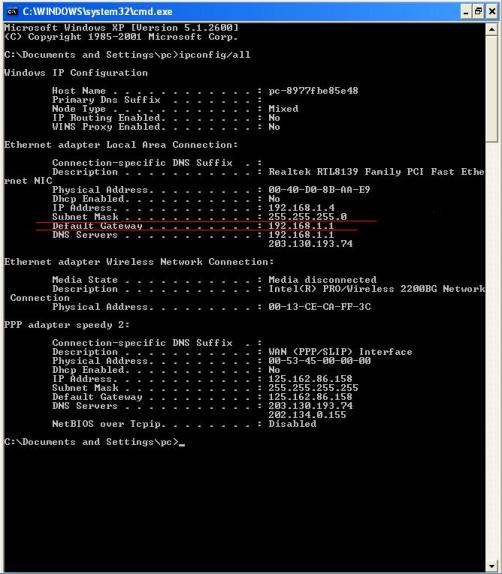
Lihat IP modem: Klik Start – Run – ketik cmd (pada Windows XP/Vista),command (pada Windows 98/2000) lalu muncul halaman command dan ketikipconfig/all dan enter. Lihat IP Gateway (modem). Misal IP Gateway adalah192.168.1.1. Gambar beikut menunjukkan displayipconfig/all.
Gambar Tampilan perintah ipconfig/all
Cek koneksi PC ke modem ADSL: Klik Start – Run, ketik ping 192.168.1.1 -t, sehingga muncul tampilan seperti gambar berikut.
Gambar koneksi PC-modem bagus
Kemudian Cek koneksi PC ke DNS Telkom: Klik Start – Run, ketik ping 202.134.0.155 -t, sehingga muncul tampilan berikut,
 |
Jika Koneksi gagal setelah login speedy dan pesan command tidak sama dengan di atas misal “request time out” atau “destination host unreachable”seperti yang ditunjukkan pada gambar.
Gambar Koneksi modem – DNS gagal
Maka lakukan troubleshooting sebagai berikut:
1. Pastikan saluran telepon baik dengan mengangkat pesawat telpon dan mendapat nada dial.
2. Pastikan kabel Ethernet Modem – PC dan kabel modem – telepon terhubung dengan baik. Tidak ada PABX, paralel telepon atau peralatan lain yang terhubung sebelum splitter.
3. Matikan modem dan tunggu sekitar 1 menit, nyalakan kembali dan pastikan lampu ADSL menyala tanpa blinking.
4. Pastikan username dan password sudah benar
Username : No.speedy@telkom.net
Password : xxxxx
5. Jika LAN disable. Klik Start – Settings – Control Panel – Network connection – Local Area Connection, Double klik Local Area Connection untuk men-enablekan LAN.
6. ADSL tidak blinking tetapi koneksi PC ke DNS “request time out”. Matikan fitur firewall (lihat user manual modem) di sisi modem, lakukan restart modem ADSL.
7. Pesan DNS masih “request time out” atau tidak mendapat IP. Lakukan setting IP:
a.Pada windows XP
Klik Start – Settings – Control Panel – Network connection – Local Area Connection – TCP/IP. Isi kolom TCP/IP berikut:
IP address : 192.168.1.x (x dapat diisi angka 2 sampai 253)
Subnet mask : 255.255.255.0
Gateway : 192.168.1.1 (Harus sama dengan IP address modem)
Preferred DNS : 192.168.1.1 dan Alternate DNS : 202.134.0.155
b.Pada Windows 98/ME/2000
Klik Start – Settings – Control Panel – Network – Configuration tab – TCP/IP Properties. Isi kolom TCP/IP sebagai berikut:
IP address : 192.168.1.x (x dapat diisi angka 2 sampai 253)
Subnet mask : 255.255.255.0
Preferred DNS : 192.168.1.1dan Alternate DNS : 202.134.0.155
8. Jika modem hang. Refresh dan Setting ulang modem via menu modem (lihat user manual modem, Note: VPI=8, VCI=81 untuk kota Padang)
9. Hubungi 147 untuk informasi lebih lanjut.
Nah untuk anda yang berlangganan Speedy berbasis ADSL ini, kalo ada gangguan coba deh ikutin cara-cara ini dan jangan cepat2 utk nelpon ke 147. Oke
Berikut isi lembaran petunjuk troubleshooting dalam Bahasa Inggris.
TROUBLESHOOTING SPEEDY
Check IP Router: Select Start – Run – type cmd (for Windows xp/Vista),command (for Windows 98/2000) so display command tab, type ipconfig/all and select enter. Check IP Gateway (router), for instance IP Gateway is 192.168.1.1(lihat pada Gambar ).
Check connection, PC to ADSL Router: Select Start – Run, Type ping 192.168.1.1 –t (lihat Gambar )
Check connection, PC to DNS: Select Start – Run, Type ping 202.134.0.155 –t(lihat Gambar )
If connection is failure after Login and command displays not same as above like“request time out” or “destination host unreachable” (lihat gambar ). Do Troubleshooting:
1. Ensure that line is good by checking phone. Phone has a dial tone.
2. Ensure that Ethernet cable, ADSL Router – PC and Router-line connecting well. No PABX, no parallel phone or other devices connecting to line before splitter connected at first.
3. Unplug ADSL router and wait for 1 minute, then plug again and ensure that router is turned on the DSL solid.
4. Ensure that username and password are true
Username : No.speedy@telkom.net
Password : xxxxx
5. LAN is disable. Select Start – Settings – Control Panel – Network connection – Local Area Connection, for enabling LAN.
6. ADSL is not flash but connection PC to DNS “request time out”. disabling any firewall router (look at user manual for router), then restart ADSL router.
7. Command displays “request time out” or has no IP. Set IP:
a.Windows XP
Select Start – Settings – Control Panel – Network connection – Local Area Connection – TCP/IP. Type as follow:
IP address : 192.168.1.x (x typed by 2 to 253)
Subnet mask : 255.255.255.0
Gateway : 192.168.1.1 (This must be your Router’s IP address)
Preferred DNS : 192.168.1.1 and Alternate DNS : 202.134.0.155
b.Windows 98/ME/2000
Select Start – Settings – Control Panel – Network – Configuration tab – TCP/IP Properties. Type as follow:
IP address : 192.168.1.x (x typed by 2 to 253)
Subnet mask : 255.255.255.0
Preferred DNS : 192.168.1.1 and Alternate DNS : 202.134.0.155
8. Set and Refresh ADSL router (look at user manual for router, Note: VPI=8, VCI=81 in Padang)
9. Call 147 for more information.
sumber : http://ardiansyahputra.wordpress.com/2007/09/12/12/
Klik Start – Settings – Control Panel – Network connection – Local Area Connection – TCP/IP. Isi kolom TCP/IP berikut:
IP address : 192.168.1.x (x dapat diisi angka 2 sampai 253)
Subnet mask : 255.255.255.0
Gateway : 192.168.1.1 (Harus sama dengan IP address modem)
Preferred DNS : 192.168.1.1 dan Alternate DNS : 202.134.0.155
b.Pada Windows 98/ME/2000
Klik Start – Settings – Control Panel – Network – Configuration tab – TCP/IP Properties. Isi kolom TCP/IP sebagai berikut:
IP address : 192.168.1.x (x dapat diisi angka 2 sampai 253)
Subnet mask : 255.255.255.0
Preferred DNS : 192.168.1.1dan Alternate DNS : 202.134.0.155
8. Jika modem hang. Refresh dan Setting ulang modem via menu modem (lihat user manual modem, Note: VPI=8, VCI=81 untuk kota Padang)
9. Hubungi 147 untuk informasi lebih lanjut.
Nah untuk anda yang berlangganan Speedy berbasis ADSL ini, kalo ada gangguan coba deh ikutin cara-cara ini dan jangan cepat2 utk nelpon ke 147. Oke
Berikut isi lembaran petunjuk troubleshooting dalam Bahasa Inggris.
TROUBLESHOOTING SPEEDY
Check IP Router: Select Start – Run – type cmd (for Windows xp/Vista),command (for Windows 98/2000) so display command tab, type ipconfig/all and select enter. Check IP Gateway (router), for instance IP Gateway is 192.168.1.1(lihat pada Gambar ).
Check connection, PC to ADSL Router: Select Start – Run, Type ping 192.168.1.1 –t (lihat Gambar )
Check connection, PC to DNS: Select Start – Run, Type ping 202.134.0.155 –t(lihat Gambar )
If connection is failure after Login and command displays not same as above like“request time out” or “destination host unreachable” (lihat gambar ). Do Troubleshooting:
1. Ensure that line is good by checking phone. Phone has a dial tone.
2. Ensure that Ethernet cable, ADSL Router – PC and Router-line connecting well. No PABX, no parallel phone or other devices connecting to line before splitter connected at first.
3. Unplug ADSL router and wait for 1 minute, then plug again and ensure that router is turned on the DSL solid.
4. Ensure that username and password are true
Username : No.speedy@telkom.net
Password : xxxxx
5. LAN is disable. Select Start – Settings – Control Panel – Network connection – Local Area Connection, for enabling LAN.
6. ADSL is not flash but connection PC to DNS “request time out”. disabling any firewall router (look at user manual for router), then restart ADSL router.
7. Command displays “request time out” or has no IP. Set IP:
a.Windows XP
Select Start – Settings – Control Panel – Network connection – Local Area Connection – TCP/IP. Type as follow:
IP address : 192.168.1.x (x typed by 2 to 253)
Subnet mask : 255.255.255.0
Gateway : 192.168.1.1 (This must be your Router’s IP address)
Preferred DNS : 192.168.1.1 and Alternate DNS : 202.134.0.155
b.Windows 98/ME/2000
Select Start – Settings – Control Panel – Network – Configuration tab – TCP/IP Properties. Type as follow:
IP address : 192.168.1.x (x typed by 2 to 253)
Subnet mask : 255.255.255.0
Preferred DNS : 192.168.1.1 and Alternate DNS : 202.134.0.155
8. Set and Refresh ADSL router (look at user manual for router, Note: VPI=8, VCI=81 in Padang)
9. Call 147 for more information.
sumber : http://ardiansyahputra.wordpress.com/2007/09/12/12/
06 Oktober 2011
IPAD PASSCODE
You could put a passcode lock and secure your iPad. But what if you have forgotten the password? You will be unable to access your iPad. But there is a way to overcome this problem. Some of them may not be thinking of this idea. It is really simple. Just restore your iPad from the backup taken by iTunes which doesn’t contain the password/passcode lock. Here is how to restore your iPad.
1. Connect the iPad with your PC.
2. In iTunes, select iPad from the ” Devices ” list.
3. Under the summary tab, click on the ” Restore ” button.
4. iTunes will ask you to take a backup. Don’t do it and skip the step.
1. Connect the iPad with your PC.
2. In iTunes, select iPad from the ” Devices ” list.
3. Under the summary tab, click on the ” Restore ” button.
4. iTunes will ask you to take a backup. Don’t do it and skip the step.
05 Oktober 2011
PROJECT INVESTASI
LANGKAH-SEDERHANA
Fase pertama :
1. Manajer Proyek yang ditugaskan, proyek awal (dan anggaran) didefinisikan, studi kelayakan selesai.
2. Awal proyek disetujui dan anggaran dialokasikan
3. Enjinering Proses mengembangkan material balance sheet
4. Manajer Proyek ditugaskan memimpin enjiner untuk semua disiplin ilmu
5. Personil enjinering Proses dan enjinering proses Kontrol mengembangkan P & ID dan diagram logika awal.
6. Pimpinan enjiner mengkaji ruang lingkup proyek dan ruang lingkup perubahan jika diperlukan
7. Enjiner Listrik menetapkan klasifikasi daerah listrik.
8. Manajer Proyek tunduk kepada manajemen jadwal proyek secara keseluruhan, suatu peninjauan definisi proyek, dan anggaran proyek (pada ± 30%).
Fase Kedua :
9. Manajemen menyetujui ±30% anggaran
10. Enjinering Awal (front-end) mulai untuk :
o Menyiapkan jadwal proses kontrol,
o Menyiapkan ruang lingkup definisi kontrol dan mengidentifikasi vendor pilihan,
o Indeks menyiapkan instrumen awal,
o Update P & ID dan diagram logika yang diperlukan, dan
o Meninjau perkiraan biaya dan kirimkan kembali pada ± 20%.
11. Manajemen menyetujui ±20% anggaran
12. Enjinering proses kontrol detail mulai :
• Menyiapkan lembar data proses dan disampaikan kepada enjiner proses untuk melengkapi informasi proses,
• Review spesifikasi mekanis dan pipa,
• Menyiapkan semua dokumentasi desain rinci (lihat bab 14),
• Membangun interface antara enjiner proses kontrol dan enjiner listrik,
• Memberikan informasi untuk enjiner listrik (misalnya, persyaratan catu daya dan kabel),
• Memberikan informasi untuk enjiner mesin (untuk memasang perangkat in-line), dan
• Menyiapkan permintaan, mengevaluasi tawaran, memilih vendor, dan melakukan pemesanan.
13. Memeriksa penyelesaian sistem (misalnya, sistem kontrol, sistem analyzer, dan panel dan lemari) pada fasilitas vendor
14. Pengiriman Peralatan
15. Mulai konstruksi instalasi instrumen, pemeriksaan, komisioning, dan tuning loop
Fase ketiga :
16. Start Up Plant
17. Enjinering komplit
18. Sistem control selesai, diserahkan kepada operasi.
Detail Engineering
Detail engineering harus berdasarkan persyaratan hukum yang berlaku di lokasi proyek dan persyaratan dari front-end engineering. Dokumentasi yang dihasilkan di bawah detail engineering akan bervariasi sesuai dengan kompleksitas proses, persyaratan proyek, dan filosofi unit dan budaya. Berikut ini dianggap sebagai informasi teknis minimum untuk bidang I & C; manajemen teknik harus memutuskan apakah ada dokumen tambahan yang diperlukan:
• Instrumen indeks.
• Proses lembar data
• Lembar spesifikasi Instrumen, termasuk perhitungan (untuk katup kontrol, pelat orifice, dll)
• Loop diagram
• Interlock diagram
• Spesifikasi kontrol Panel (termasuk layout keseluruhan).
• Persyaratan ruang kontrol (lihat modul pada pusat kontrol)
• Manual untuk sistem elektronik diprogram (DCS, PLC, PC, dll)
• Alarm dan trip sistem dokumentasi dan prosedur pengujian (lihat pada modul alarm dan trip sistem)
• Spesifikasi Instalasi (lihat bab lainnya untuk informasi lebih lanjut tentang menginstal instrumen)
Selain dokumen-dokumen, gambar lokasi disusun yang menunjukkan lokasi dari semua perangkat I & C. Juga, dua tambahan dokumen yang secara umum tidak disiapkan oleh disiplin I & C tetapi yang sangat penting bagi I & C tahap perancangan detil: gambar perpipaan dan lokasi dan gambar tata letak saluran
Fase pertama :
1. Manajer Proyek yang ditugaskan, proyek awal (dan anggaran) didefinisikan, studi kelayakan selesai.
2. Awal proyek disetujui dan anggaran dialokasikan
3. Enjinering Proses mengembangkan material balance sheet
4. Manajer Proyek ditugaskan memimpin enjiner untuk semua disiplin ilmu
5. Personil enjinering Proses dan enjinering proses Kontrol mengembangkan P & ID dan diagram logika awal.
6. Pimpinan enjiner mengkaji ruang lingkup proyek dan ruang lingkup perubahan jika diperlukan
7. Enjiner Listrik menetapkan klasifikasi daerah listrik.
8. Manajer Proyek tunduk kepada manajemen jadwal proyek secara keseluruhan, suatu peninjauan definisi proyek, dan anggaran proyek (pada ± 30%).
Fase Kedua :
9. Manajemen menyetujui ±30% anggaran
10. Enjinering Awal (front-end) mulai untuk :
o Menyiapkan jadwal proses kontrol,
o Menyiapkan ruang lingkup definisi kontrol dan mengidentifikasi vendor pilihan,
o Indeks menyiapkan instrumen awal,
o Update P & ID dan diagram logika yang diperlukan, dan
o Meninjau perkiraan biaya dan kirimkan kembali pada ± 20%.
11. Manajemen menyetujui ±20% anggaran
12. Enjinering proses kontrol detail mulai :
• Menyiapkan lembar data proses dan disampaikan kepada enjiner proses untuk melengkapi informasi proses,
• Review spesifikasi mekanis dan pipa,
• Menyiapkan semua dokumentasi desain rinci (lihat bab 14),
• Membangun interface antara enjiner proses kontrol dan enjiner listrik,
• Memberikan informasi untuk enjiner listrik (misalnya, persyaratan catu daya dan kabel),
• Memberikan informasi untuk enjiner mesin (untuk memasang perangkat in-line), dan
• Menyiapkan permintaan, mengevaluasi tawaran, memilih vendor, dan melakukan pemesanan.
13. Memeriksa penyelesaian sistem (misalnya, sistem kontrol, sistem analyzer, dan panel dan lemari) pada fasilitas vendor
14. Pengiriman Peralatan
15. Mulai konstruksi instalasi instrumen, pemeriksaan, komisioning, dan tuning loop
Fase ketiga :
16. Start Up Plant
17. Enjinering komplit
18. Sistem control selesai, diserahkan kepada operasi.
Detail Engineering
Detail engineering harus berdasarkan persyaratan hukum yang berlaku di lokasi proyek dan persyaratan dari front-end engineering. Dokumentasi yang dihasilkan di bawah detail engineering akan bervariasi sesuai dengan kompleksitas proses, persyaratan proyek, dan filosofi unit dan budaya. Berikut ini dianggap sebagai informasi teknis minimum untuk bidang I & C; manajemen teknik harus memutuskan apakah ada dokumen tambahan yang diperlukan:
• Instrumen indeks.
• Proses lembar data
• Lembar spesifikasi Instrumen, termasuk perhitungan (untuk katup kontrol, pelat orifice, dll)
• Loop diagram
• Interlock diagram
• Spesifikasi kontrol Panel (termasuk layout keseluruhan).
• Persyaratan ruang kontrol (lihat modul pada pusat kontrol)
• Manual untuk sistem elektronik diprogram (DCS, PLC, PC, dll)
• Alarm dan trip sistem dokumentasi dan prosedur pengujian (lihat pada modul alarm dan trip sistem)
• Spesifikasi Instalasi (lihat bab lainnya untuk informasi lebih lanjut tentang menginstal instrumen)
Selain dokumen-dokumen, gambar lokasi disusun yang menunjukkan lokasi dari semua perangkat I & C. Juga, dua tambahan dokumen yang secara umum tidak disiapkan oleh disiplin I & C tetapi yang sangat penting bagi I & C tahap perancangan detil: gambar perpipaan dan lokasi dan gambar tata letak saluran
SUDIARNI
Langganan:
Postingan (Atom)